Advertise

Clico

Conversational AI & ChatbotsExtensions ChatGPTWriting & Web SEO

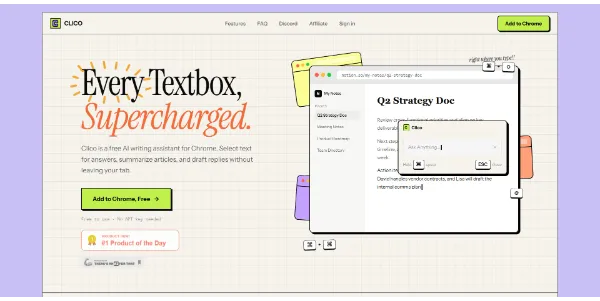
This AI assistant integrates into every text field in your browser (Gmail, Notion, Slack, LinkedIn, etc.) to help you write, reply, rephrase, or dictate instantly. You stay in the same context without switching tabs or copying and pasting. Available via a Chrome extension

Clicks

47

Ranked in AIForest

Impressions

5,392

Directory views

Category

Conversational AI & Chatbots

Free

Listed

June 2026

Conversational AI & Chatbots, Extensions ChatGPT

Screenshot

tryclico.com

Pros and cons

Pros

  • Eliminates the need to switch tabs between AI tools and work apps
  • Supports a wide range of platforms including Slack and LinkedIn
  • Includes dictation features for hands-free content creation
  • Maintains workflow context by working directly inside the text box

Cons

  • Requires a Chrome-based browser for full extension functionality
  • Access to active text fields may require specific privacy permissions
  • Performance may vary depending on the specific website's DOM structure
  • Potential for unknown daily usage caps or character limits on the free tier

FAQ

How does Clico integrate with my browser text fields?

Clico operates as a Chrome extension that detects active text areas on websites like Gmail, Notion, and LinkedIn. Once installed, it provides an overlay or shortcut within those fields, allowing you to generate text or rephrase existing content without leaving your current tab or copying data back and forth between different AI chat interfaces.

Can I use Clico for voice-to-text dictation?

While the core functionality focuses on text generation and rephrasing, users should verify the specific voice-to-text capabilities on the official website. The tool is designed to assist with dictation directly into browser fields, making it a potential solution for users who prefer speaking their drafts or replies rather than typing them manually.