 PipedriveFree trialSales management tool designed to track every opportunity, from initial contact to closing. You can view your pipeline, automate follow-ups with AI, schedule activities, and use charts or reports to increase your conversion rate
An online collaborative visual workspace for brainstorming, planning and executing your projects. It provides tools for diagramming, whiteboarding, task management and more
Miro serves as a centralized hub for teams to transition from abstract brainstorming to concrete project execution within a single visual environment. As a collaborative workspace, it bridges the gap between traditional whiteboarding and digital task management, allowing distributed teams to interact in real-time.
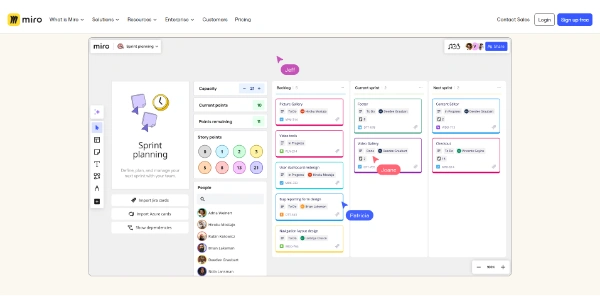
The platform is particularly effective for mapping out complex workflows, designing user journeys, and managing agile sprints through its flexible canvas. Users can leverage a variety of visual aids, including sticky notes, diagrams, and connectors, to organize thoughts and track progress.
In the context of business and marketing, Miro facilitates cross-functional alignment by providing a transparent view of project timelines and strategic goals. While it offers a robust set of productivity tools, teams should evaluate how its infinite canvas integrates with their existing documentation standards.
Whether you are conducting a remote workshop or planning a high-level product roadmap, the platform aims to streamline the creative process and ensure that all stakeholders remain synchronized throughout the project lifecycle.
Compare Miro with alternative Business & Marketing tools before choosing a product.
PipedriveFree trialSales management tool designed to track every opportunity, from initial contact to closing. You can view your pipeline, automate follow-ups with AI, schedule activities, and use charts or reports to increase your conversion rate GuiddeFreemiumA generative AI platform for companies specializing in creation of documentation by video. Google Chrome extension available
 DurablePaidCreate your professional website in seconds thanks to AI. The platform integrates intelligent marketing tools, a CRM and automated SEO management to develop your business
 VmakeAIFreemiumTurn a product link, photo, or idea into UGC videos that are ready to drive conversions. The tool combines AI-powered avatar generation, automatic captions, up to 4K upscaling, background removal, and visual optimization into a single workflow designed for TikTok, Reels, and Shopify
 Flair AIFreeImage generator to design photos or images for marketing
Miro is listed with a Freemium pricing model, offering a baseline set of features for free users. To access advanced collaboration tools, unlimited boards, or enterprise-grade security features, users should review the current subscription tiers on the official website to determine which plan best fits their team's specific scale.
Explore similar AI tools from the same category and use case.
 Reclaim AIFreemiumAn AI assistant that plays the secretary and plans your tasks according to your agenda
 GeniusReviewFreeAn AI-driven tool that makes it quick and easy to evaluate corporate recruitment. File design and automatic analysis
 Bedrock (Amazon)FreeA generative AI in direct competition with ChatGPT. Created by Amazon company
 NamelixFreeThis artificial intelligence helps you easily find a name for your business, brand, or company. It also offers design ideas for your future logo.
 Benchmark EmailFreeCreate professional and attractive emails
Miro provides a real-time, multi-user environment where team members can see each other's cursors and contributions instantly. This visual workspace supports various activities such as brainstorming with digital sticky notes, creating complex flowcharts, and organizing tasks. It is designed to simulate the experience of an in-person whiteboard session, making it a popular choice for remote and hybrid teams.
While Miro is primarily a visual workspace, it includes features for task management and project execution. Users can create Kanban boards, set deadlines, and assign responsibilities directly on the canvas. However, teams with highly complex technical requirements should evaluate if its visual-first approach provides enough depth compared to dedicated, database-driven project management software or if an integration is necessary.